Showing posts with label Power Supply. Show all posts
Showing posts with label Power Supply. Show all posts
Thursday, August 26, 2010
PCTech Magazine: Enermax Switching Power Supply
PCTech Magazine: Enermax Switching Power Supply: "It is all about efficiency, so goes the public mind. But being 85+ efficient was the minimum goal for our engineers. We wanted to create ..."

Enermax Switching Power Supply
It is all about efficiency, so goes the public mind. But being 85+ efficient was the minimum goal for our engineers. We wanted to create the best PSU series in any regard and to have a worthy successor to our 1kW-class defining GALAXY & GALAXY DXX series’. By making REVOLUTION 85+ as the world’s first PSU to be FUTURE CPU ready! & FUTURE GPU ready!, we have achieved it!
REVOLUTION85+ is the first of the next generation of PSU design devastating the complete competition offering the highest efficiency available combined with the most connectors and versatility and the most comprehensive design and component selection to likely power the most demanding systems of today and tommorrow.
is the first of the next generation of PSU design devastating the complete competition offering the highest efficiency available combined with the most connectors and versatility and the most comprehensive design and component selection to likely power the most demanding systems of today and tommorrow.
HardOCP is as impressed:
“… the Revolution that occurred in Enermax' top tier products really is change you can believe in. … The Revolution is not only an extremely good PSU, it is also a toss-up as to what its marquee feature is between its DC Output Quality and its efficiency. The Enermax Revolution 1050W is quite simply what product evolution should be and leaves us wondering just one thing. What rabbit is Enermax going to pull out of the hat for its next power supply?”
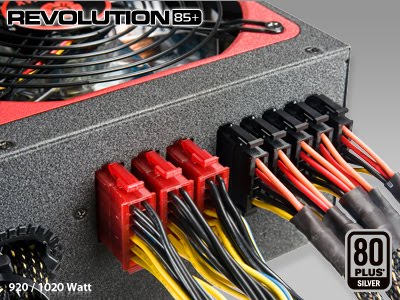
| 85PLUS ready! | World’s first PSU series with 86-92.9% efficiency @ 20-100% load. Certified by 80 PLUS® organizations. |
| FUTURE CPU ready! | Ready for most upcoming CPU generations by 12P sockets for possible connector changes, by complying to latest EPS12V PSU design guides for compatibility & by ZERO LOAD Design for C6 state functions. |
| FUTURE GPU ready! | Ready for most upcoming GPU generations by 12P sockets for possible connector changes, by six massive 12V rails for perfect load distribution & by ZERO LOAD Design for Hybrid Mode functions. |
| 24/7 @ 50°C ready! | Non-Stop industrial class performance at 50°C/122°F ambient. |
| CordGuard | Fixing the AC cord tightly to avoid accidental shutdowns of your PC. |
| HeatGuard | Keeping PSU fan running for 30-60 seconds after shut down to dissipate the remaining system heat prolonging lifetime by up to 20%. |
| SafeGuard | Industry-leading octuple protection circuitry (OCP, OVP, AC UVP, DC UVP, OPP, OTP, SCP, and SIP). |
| AirGuard | Patented air-inlet with optimal aero-dynamical design reducing noisy air turbulences. |
| Silent ready! | Ultra-quiet 13.9cm fan with intelligent RPM control guarantees cool performance and silent operation. |
| PowerGuard | PSU status monitor with 4-mode LED (Off / Stand-by / OK / Fail). |
| AirGuard | Patented air-inlet with optimal aero-dynamical design reducing noisy air turbulences. |
| 99% 12V Power | World's first EPS12V PSU with 99% 12V output capability. |
| SERVER ready! | SSI PSDG 2009 support for latest Intel® Core™ Extreme/i7, Xeon™ and AMD® Opteron™ and SLI™ or CrossFireX™ and AMD GAME! or AMD GAME! Ultra systems and downward compatible with SSI PSDG 2008 1.0, EPS12V 2.92, 2.91, 2.8. |
| DXX ready! | 100% 6+2P (8P) PCI-E connector to support new generation DXXI graphic cards. |


Wednesday, August 25, 2010
Uninterruptible Power Supply (UPS) - APC
Best Value Battery Backup & Protection for Home Computers


The most popular desktop UPS in the world!
The Back-UPS ES offers our best value for protecting your home and home office computer systems. Completely redesigned to use less power during normal operation, the Back-UPS ES provides enough backup power for you to work through short and medium length power outages. It also safeguards your equipment from damaging surges and spikes that travel along your utility and data lines. Most models include our award-winning software, which automatically saves open files and gracefully shuts down your computer during extended outages. Additional features like an audible alarm, LED status indicator, user replaceable battery, push-button circuit breaker and transformer-block spaced outlets make the Back-UPS ES the perfect unit to protect your productivity from the constant threat of power outages and lost data.
| |||||||
| Estimated Runtime (hrs:mins) | Products | Part Number | |||||
| 230V Output / 230V Input | |||||||
| 0:06 | APC BACK-UPS ES 500VA 230V PHILIPPINES | BE500R-PH | |||||
| 0:09 | Back-UPS ES 525 Universal for ASE | BE525-AS | |||||
Features & Benefits
| Protection | |
| Battery-protected and surge-only outlets | Reserves power capacity and run time for connected equipment that require battery back-up while providing surge only protection for less critical equipment |
| Power conditioning | Protects connected loads from surges, spikes, lightning, and other power disturbances. |
| Safety-agency approved | Ensures the product has been tested and approved to work safely with the connected service provider equipment and within the specified environment. |
| Convenience | |
| Audible alarms | Provides notification of changing utility power and UPS conditions. |
| Automatic self-test | Periodic battery self-test ensures early detection of a battery that needs to be replaced. |
| Cold-start capable | Provides temporary battery power when the utility power is out. |
| Hot-swappable batteries | Ensures clean, uninterrupted power to protected equipment while batteries are being replaced |
| Resettable circuit breakers | Enables a quick recovery from overload events. |
| Transformer-block spaced outlets | Protect equipment with input transformer blocks without blocking access to other receptacles. |
Best Value Battery Backup & Protection for Business Computers

The re-invention of the most relied upon desktop UPS in history: the Back-UPS!
The Back-UPS CS offers our best value for protecting your business and office computer systems. It provides battery backup power that allows you to work through short and medium length power outages. It also safeguards your equipment from damaging surges and spikes that travel along your utility and phone lines. Award-winning shutdown software automatically powers down your computer system in the event of an extended power outage. Additional features like audible alarms, LED status indicators, user replaceable battery, push-button circuit breakers and transformer-block spaced outlets make the Back-UPS CS the perfect unit to protect your business' productivity from the constant threat of power outages and lost data.
| |||||||
| Estimated Runtime (hrs:mins) | Products | Part Number | |||||
| 230V Output / 230V Input | |||||||
| -- | APC BACK-UPS CS 350VA USB/SERIAL 230V | BK350EI | |||||
| 0:04 | APC BACK-UPS CS 500VA 230V USB/SERIAL | BK500EI | |||||
| 0:08 | APC BACK-UPS CS 650VA 230V ASEAN | BK650-AS | |||||
Features & Benefits
| Protection | |
| Data line surge protection | Protects connected loads from surges, spikes, lightning, and other power disturbances. |
| Battery-protected and surge-only outlets | Reserves power capacity and run time for connected equipment that require battery back-up while providing surge only protection for less critical equipment |
| Convenience | |
| LED status indicators | Quickly understand unit and power status with visual indicators. |
| Audible alarms | Provides notification of changing utility power and UPS conditions. |
| Transformer-block spaced outlets | Protect equipment with input transformer blocks without blocking access to other receptacles. |
| Automatic self-test | Periodic battery self-test ensures early detection of a battery that needs to be replaced. |
| Battery replacement without tools | Allows quick, easy battery replacement. |
| Availability | |
| Cold-start capable | Provides temporary battery power when the utility power is out. |
| Hot-swappable batteries | Ensures clean, uninterrupted power to protected equipment while batteries are being replaced |
| Automatic restart of loads after UPS shutdown | Automatically starts up the connected equipment upon the return of utility power. |
| Resettable circuit breakers | Enables a quick recovery from overload events. |
| Safety | |
| Safety-agency approved | Ensures the product has been tested and approved to work safely with the connected service provider equipment and within the specified environment. |
High Performance Battery Backup & Protection for Business Computers


Best solution for poor power regions and applications requiring longer runtimes.
The Back-UPS RS offers high performance protection for your business and office computer systems. It provides abundant battery backup power, allowing you to work through medium and extended length power outages. It also safeguards your equipment from damaging surges and spikes that travel along utility, phone and network lines. A distinguishing feature of the Back-UPS RS is automatic voltage regulation (AVR). AVR instantly adjusts both low and high voltages to safe levels, so you can work indefinitely during brownouts and overvoltage situations, saving the battery for power outages when you need it most. Award-winning shutdown software automatically powers down your computer system in the event of an extended power outage. Additional features like audible alarms, LED status indicators, user replaceable battery, push-button circuit breakers and plentiful outlets (including transformer-block spaced outlets) make the Back-UPS RS the perfect unit to protect your business' productivity from the constant threat of power problems and lost data.
| |||||||
| Estimated Runtime (hrs:mins) | Products | Part Number | |||||
| 230V Output / 230V Input | |||||||
| 0:03 | APC Back-UPS RS 500, 230V without auto shutdown software, ASEAN | BR500CI-AS | |||||
| 0:05 | Back-UPS RS 500VA | BR500I | |||||
| 0:04 | Power Saving Back-UPS Pro 550 | BR550GI | |||||
| 0:05 | APC Back-UPS RS 650VA, 230V, without auto-shutdown software, ASEAN | BR650CI-AS | |||||
| 0:15 | APC BACK-UPS RS 800VA 230V | BR800I | |||||
| 0:14 | APC Back-UPS RS 1100VA, 230V, without auto shutdown software, ASEAN | BR1100CI-AS | |||||
| 0:16 | APC Back-UPS RS 1200VA LCD 230V | BR1200LCDI | |||||
| 0:19 | APC BACK-UPS RS 1500VA 230V | BR1500I | |||||
| 0:16 | APC Back-UPS RS 1500VA LCD 230V | BR1500LCDI | |||||
Features & Benefits
| Protection | |
| Battery-protected and surge-only outlets | Reserves power capacity and run time for connected equipment that require battery back-up while providing surge only protection for less critical equipment |
| Safety-agency approved | Ensures the product has been tested and approved to work safely with the connected service provider equipment and within the specified environment. |
| Power conditioning | Protects connected loads from surges, spikes, lightning, and other power disturbances. |
| Convenience | |
| Audible alarms | Provides notification of changing utility power and UPS conditions. |
| Automatic restart of loads after UPS shutdown | Automatically starts up the connected equipment upon the return of utility power. |
| Automatic self-test | Periodic battery self-test ensures early detection of a battery that needs to be replaced. |
| Battery replacement without tools | Allows quick, easy battery replacement. |
| LED status indicators | Quickly understand unit and power status with visual indicators. |
| Cold-start capable | Provides temporary battery power when the utility power is out. |
| Hot-swappable batteries | Ensures clean, uninterrupted power to protected equipment while batteries are being replaced |
| Resettable circuit breakers | Enables a quick recovery from overload events. |
| Transformer-block spaced outlets | Protect equipment with input transformer blocks without blocking access to other receptacles. |
| User-replaceable batteries | Increases availability by allowing a trained user to perform upgrades and replacements of the batteries reducing Mean Time to Repair (MTTR) |
| Manageability | |
| Adjustable voltage sensitivity | Provides the ability to adapt the UPS for optimal performance in specific power environments or generator applications. |
| Adjustable voltage-transfer points | Maximizes useful battery life by widening the input voltage window or tightening the output voltage regulation. |
| Intelligent battery management | Micro-processor controlled battery charging and diagnostic testing ensures maximum battery life. |

Sunday, August 22, 2010
How does a computers uninterruptible power supply UPS work?
A UPS generally protects a computer against four different power problems:
- Voltage surges and spikes - Times when the voltage on the line is greater than it should be
- Voltage sags - Times when the voltage on the line is less than it should be
- Total power failure - Times when a line goes down or a fuse blows somewhere on the grid or in the building
- Frequency differences - Times when the power is oscillating at something other than 60 Hertz

There are two common systems in use today: standby UPS and continuous UPS. A standby UPS runs the computer off of the normal utility power until it detects a problem. At that point, it very quickly (in five milliseconds or less) turns on a power inverter and runs the computer off of the UPS's battery (see How Batteries Work for more information). A power inverter simply turns the DC power delivered by the battery into 120-volt, 60-Hertz AC power.
In a continuous UPS, the computer is always running off of battery power and the battery is continuously being recharged. You could fairly easily build a continuous UPS yourself with a largish battery charger, a battery and a power inverter. The battery charger continuously produces DC power, which the inverter continuously turns back into 120-volt AC power. If the power fails, the battery provides power to the inverter. There is no switch-over time in a continuous UPS. This setup provides a very stable source of power.
Standby UPS systems are far more common for home or small-business use because they tend to cost about half as much as a continuous system. Continuous systems provide extremely clean, stable power, so they tend to be used in server rooms and mission critical applications.
Saturday, August 21, 2010
The Switching Power Supply


If there is any one component that is absolutely vital to the operation of a computer, it is the power supply. Without it, a computer is just an inert box full of plastic and metal. The power supply converts the alternating current (AC) line from your home to the direct current (DC) needed by the personal computer. In this article, we'll learn how PC power supplies work and what the wattage ratings mean.
In a personal computer (PC), the power supply is the metal box usually found in a corner of the case. The power supply is visible from the back of many systems because it contains the power-cord receptacle and the cooling fan.
Power supplies, often referred to as "switching power supplies", use switcher technology to convert the AC input to lower DC voltages. The typical voltages supplied are:
- 3.3 volts
- 5 volts
- 12 volts
ATX12V 2.0 is a novel common ATX standard, use 24 pin connector.

Changes to ATX standard were made to support 75 watt PCI Express requirements. New ATX v 2.x uses new connector, but most motherboards nowdays allow to use an old ATX v 1.x power supply with 20 pin connector - it connects to 24 pin motherboard receptacle.
| Pin | Name | Color | Description | |
|---|---|---|---|---|
| 1 | 3.3V | Orange | +3.3 VDC | |
| 2 | 3.3V | Orange | +3.3 VDC | |
| 3 | COM | Black | Ground | |
| 4 | 5V | Red | +5 VDC | |
| 5 | COM | Black | Ground | |
| 6 | 5V | Red | +5 VDC | |
| 7 | COM | Black | Ground | |
| 8 | PWR_OK | Gray | Power Ok is a status signal generated by the power supply to notify the computer that the DC operating voltages are within the ranges required for proper computer operation (+5 VDC when power is Ok) | |
| 9 | 5VSB | Purple | +5 VDC Standby Voltage (max 10mA) | |
| 10 | 12V | Yellow | +12 VDC | |
| 11 | 12V | Yellow | +12 VDC | |
| 12 | 3.3V | Orange | +3.3 VDC | |
| 13 | 3.3V | Orange | +3.3 VDC | |
| 14 | -12V | Blue | -12 VDC | |
| 15 | COM | Black | Ground | |
| 16 | /PS_ON | Green | Power Supply On (active low). Short this pin to GND to switch power supply ON, disconnect from GND to switch OFF. | |
| 17 | COM | Black | Ground | |
| 18 | COM | Black | Ground | |
| 19 | COM | Black | Ground | |
| 20 | -5V | White | -5 VDC (this is optional on newer ATX-2 supplies, it is for use with older AT class expansion cards and can be omitted on newer units) | |
| 21 | +5V | Red | +5 VDC | |
| 22 | +5V | Red | +5 VDC | |
| 23 | +5V | Red | +5 VDC | |
| 24 | COM | Black | Ground |
The 3.3- and 5-volts are typically used by digital circuits, while the 12-volt is used to run motors in disk drives and fans. The main specification of a power supply is in watts. A watt is the product of the voltage in volts and the current in amperes or amps. If you have been around PCs for many years, you probably remember that the original PCs had large red toggle switches that had a good bit of heft to them. When you turned the PC on or off, you knew you were doing it. These switches actually controlled the flow of 120 volt power to the power supply.
Today you turn on the power with a little push button, and you turn off the machine with a menu option. These capabilities were added to standard power supplies several years ago. The operating system can send a signal to the power supply to tell it to turn off. The push button sends a 5-volt signal to the power supply to tell it when to turn on. The power supply also has a circuit that supplies 5 volts, called VSB for "standby voltage" even when it is officially "off", so that the button will work. See the next page to learn more about switcher technology.
Switcher Technology
 In this photo you can see three small transformers (yellow) in the center. To the left are two cylindrical capacitors. The large finned pieces of aluminum are heat sinks. The left heat sink has transistors attached to it. These are the transistors in charge of doing the switching -- they provide high-frequency power to the transformers. Attached to the right heat sink are diodes that rectify AC signals and turn them into DC signals
 Prior to 1980 or so, power supplies tended to be heavy and bulky. They used large, heavy transformers and huge capacitors (some as large as soda cans) to convert line voltage at 120 volts and 60 hertz into 5 volts and 12 volts DC.
The switching power supplies used today are much smaller and lighter. They convert the 60-Hertz (Hz, or cycles per second) current to a much higher frequency, meaning more cycles per second. This conversion enables a small, lightweight transformer in the power supply to do the actual voltage step-down from 110 volts (or 220 in certain countries) to the voltage needed by the particular computer component. The higher-frequency AC current provided by a switcher supply is also easier to rectify and filter compared to the original 60-Hz AC line voltage, reducing the variances in voltage for the sensitive electronic components in the computer.
A switcher power supply draws only the power it needs from the AC line. The typical voltages and current provided by a power supply are shown on the label on a power supply.
Switcher technology is also used to make AC from DC, as found in many of the automobile power inverters used to run AC appliances in an automobile and in uninterruptible power supplies. Switcher technology in automotive power inverters changes the direct current from the auto battery into alternating current. The transformer uses alternating current to make the transformer in the inverter step the voltage up to that of household appliances (120 VAC).
Power Supply Standardization
Over time, there have been at least six different standard power supplies for personal computers. Recently, the industry has settled on using ATX-based power supplies. ATX is an industry specification that means the power supply has the physical characteristics to fit a standard ATX case and the electrical characteristics to work with an ATX motherboard.
PC power-supply cables use standardized, keyed connectors that make it difficult to connect the wrong ones. Also, fan manufacturers often use the same connectors as the power cables for disk drives, allowing a fan to easily obtain the 12 volts it needs. Color-coded wires and industry standard connectors make it possible for the consumer to have many choices for a replacement power supply.
Advanced Power Management (APM) offers a set of five different states that your system can be in. It was developed by Microsoft and Intel for PC users who wish to conserve power. Each system component, including the operating system, basic input/output system (BIOS), motherboard and attached devices all need to be APM-compliant to be able to use this feature. Should you wish to disable APM because you suspect it is using up system resources or causing a conflict, the best way to do this is in the BIOS. That way, the operating system won't try to reinstall it, which could happen if it were disabled only in the software.
Power Supply Wattage
A 500-watt switching power supply will not necessarily use more power than a 350-watt supply. A larger supply may be needed if you use every available slot on the motherboard or every available drive bay in the personal computer case. It is not a good idea to have a 350-watt supply if you have 350 watts total in devices, since the supply should not be loaded to 100 percent of its capacity.
According to PC Power & Cooling, Inc., some power consumption values (in watts) for common items in a personal computer are:
| PC Item | Watts |
| Accelerated Graphics Port (AGP) card or PCI-Express port | 20 to 35W |
| Peripheral Component Interconnect (PCI) card | 5W |
| small computer system interface (SCSI) PCI card or SATA | 20 to 25W |
| floppy disk drive | 5W |
| network interface card | 4W |
| 16X DVDD-ROM drive | 10 to 25W |
| DDRAM | 10W per 128M |
| 5200/7200 RPM Integrated Drive Electronics (IDE/SATA) hard disk drive | 20 to 11W |
| 7200 RPM IDE/SATA hard disk drive | 15 to 50W |
| Motherboard (without CPU or RAM) | 20 to 30W |
| 2.6 GHz MHz Pentium D | 65W |
| 2.5 GHz Core 2 DUO | 65W |
| 2.6 GHz Celeron D | 45W |
| 2 GHz Athlon | 45W |
Power supplies of the same form factor ("form factor" refers to the actual shape of the motherboard) are typically differentiated by the wattage they supply and the length of the warranty.
Power Supply Problems
The PC power supply is probably the most failure-prone item in a personal computer. It heats and cools each time it is used and receives the first in-rush of AC current when the PC is switched on. Typically, a stalled cooling fan is a predictor of a power supply failure due to subsequent overheated components. All devices in a PC receive their DC power via the power supply.
A typical failure of a PC power supply is often noticed as a burning smell just before the computer shuts down. Another problem could be the failure of the vital cooling fan, which allows components in the power supply to overheat. Failure symptoms include random rebooting or failure in Windows for no apparent reason.
For any problems you suspect to be the fault of the power supply, use the documentation that came with your computer. If you have ever removed the case from your personal computer to add an adapter card or memory, you can change a power supply. Make sure you remove the power cord first, since voltages are present even though your computer is off.
Power Supply Improvements
Recent motherboard and chipset improvements permit the user to monitor the revolutions per minute (RPM) of the power supply fan via BIOS and a Windows application supplied by the motherboard manufacturer. New designs offer fan control so that the fan only runs the speed needed, depending on cooling needs.
Recent designs in Web servers include power supplies that offer a spare supply that can be exchanged while the other power supply is in use. Some new computers, particularly those designed for use as servers, provide redundant power supplies. This means that there are two or more power supplies in the system, with one providing power and the other acting as a backup. The backup supply immediately takes over in the event of a failure by the primary supply. Then, the primary supply can be exchanged while the other power supply is in use.
Subscribe to:
Posts (Atom)
Popular Posts
-
If you use your computer more than a few hours per day, we suggest you not to turn off your computer at the end of the day. Instead tu...
-
 Not many people know what an aPad is. This is not surprising since it is not advertized like the iPads from Apple. The good news is t...
 -
 An Ethernet hub , active hub , network hub , repeater hub , hub or concentrator is a device for connecting multiple twisted pair or fib...
 -
A router is a very powerful piece of hardware. Linking all of your computers makes file sharing, backing up files and internet usage much ...
-
 It is extremely frustrating and annoying when your computer crashes. This is an all too common occurrence. Unfortunately when this happ...
 -
 A router is an electronic device that interconnects two or more computer networks, and selectively interchanges packets of data between...
 -
 Here are the features that I would recommend to look for before you make up the decision Resolution The first one that I would look in...
 -
PCTech Magazine: DLP Projectors : "SONY VPLDX15 This powerful mobile business projector is ideal for mid-sized conference rooms and c...
-
 AMD and Intel are the two biggest CPU and chipset makers in the world with each making specific motherboard chipsets for their CPUs. Th...

