Printer Type and Technology
Here the printer type we have considered is home photo printer but you can also buy printers which are also suited for regular day to day printing so that you need not have two printers near your computer! Considering the technology, the poplar ones for photo printing are ink-jet or thermal dye printers than laser. Most of the thermal printers are better than ink-jet for long lasting looks of the pictures and making it water proof.
A dye-sublimation printer uses a special ribbon, paper, and print head. Sublimation is the process of turning a solid directly into a gas without passing through a liquid phase. Because dye-sub printers deposit the color as a gas rather than as a liquid, the result is very much like the continuous tone of a photograph.
The most popular type of printer, an inkjet uses small drops of liquid ink in various colors to produce an image on the page. These drops are literally shot onto the paper.
A printer that uses the xerographic process to produce a print. A special drum is sensitized by a laser, picks up powdered toner, and deposits it onto a piece of paper. The toner is then heated and fused onto the paper to produce the printed page. Some "laser" printers actually use LEDs (light emitting diodes) to "write" on the drum.
Most inkjet printers use a four-color printing system with cyan, magenta, yellow, and black inks. Photo inks often add additional shades of cyan and magenta to provide a greater tonal range to prints and more photo-like output.
Most digital cameras use special memory cards to store images. The most popular of these are CompactFlash and SmartMedia cards. Some new photo printers have built-in readers that let you print images directly from these removable media cards without using a computer.
Speed
Speed is the main factor when it comes to cost. Most of the printers may give the same quality but some offer high speed printing while maintaining the quality. As a home user, you may settle for low speed and save lot of money.
Operating Cost
You may end up buying a printer of your choice now and maybe reluctant to use it later because the running cost of using photo papers and ink may be very high. You may think that you can use third-party inks and paper but each printer is designed to work at its best with a particular ink, paper and software which run behind it. The physics behind the operation of the technology differs from product to product. You may see a slight difference in quality if you use third party products but if that’s reasonable quality, it may be the better choice.
Other Features:
Number of Ink Colors – Higher number of ink colors may give professional quality of pictures but may not be necessary for home user.
Connectivity – You can always connect the printer with USB to your computer. Higher connectivity features like wireless, connecting to multiple computers at the same time are of necessity but of choice.
Scanner – Again it’s only by choice. It’s a matter of need and want.
Other features like compatibility, built in additional features like CD or DVD -writer, Digital and multimedia card reader, touch screen, preview screen, laminator etc add up the price tag so it’s better to decide what you want exactly.
Here are some Desktop Printers to choose from:
Canon Pixma iP4700
Best general-purpose inkjet printer
Pros:
Excellent value
Good balance of text, graphics and photo quality
Prints straight from camera via PictBridge
Duplex printing
Cons:
No LCD preview screen
No memory-card slots
Double-sided printing is slow
The Canon Pixma iP4700, an incremental update of the acclaimed iP4600, is quickly being recognized as the best general-use inkjet printer. While Canon's Pixma iP4000 series printers are primarily for photos, reviews say the iP4700 produces text and graphics very well, too. It's an excellent value for the price, and the iP4700 includes features, like duplex (or double-sided) printing, normally found only on pricier models. The iP4700 uses the same five ink cartridges as its predecessors, three color inks and two kinds of black -- longer-lived pigment for text, dye for photos. It costs about $60 to replace the whole set. Another perk is PictBridge compatibility, which allows printing directly from a digital camera. However, there is no LCD preview screen or memory-card slot. While the iP4700 improves slightly upon the print speeds of the sluggish iP4600, it still isn't the fastest inkjet on the market.
So far, only British review sites, including PC Pro, PC Advisor and TechRadar.com, have evaluated the new Canon Pixma iP4700. References to the ability to print directly on some CDs and DVDs don't apply to the model sold in the United States. All say the iP4700 isn't a huge leap forward, but the new version is as good or better than the older iP4600. That model is well represented in reviews, and thorough looks at the iP4600, like that at PCMag.com, can apply to the iP4700. Amazon.com and Newegg.com carry the iP4700, but users have only reviewed the iP4600 as of this update.
Canon PIXMA iP4700 Printer Key Features:
Features:
Auto Duplex Print, Auto Photo Fix II, Borderless Printing, Document Printing, Photo Printing, 2-Way Paper Feeding, 5 Individual Ink Tanks, Auto Sheet Feeder, Paper Output Tray Sensor, PictBridge
Print Speed (up to):
?Black: ESAT (Black): Approx. 9.2 ipm
?Color: ESAT (Color): Approx. 8.1 ipm
4″ x 6″ borderless photo: approx. 20 seconds
Number of Nozzles:
?Black: 320
?Color:4,096
?Total: 4,416
Print Resolution (Up to):
?Black: 600 x 600 dpi
?Color: 9600 x 2400 dpi
OS Compatibility:
Windows Vista, Windows XP/2000 and Mac OS X v10.3.9 to v10.5.x8
Standard Interface:
PictBridge (Cable not included), USB 2.0 Hi-Speed
Ink Droplet Size:
Picoliter Size: 1, 2 and 5
Paper Sizes:
4″ x 6″, 5″ x 7″, 8″ x 10″, Letter, Legal, U.S. #10 Envelopes
Output Tray Capacity:
Auto Sheet Feeder: (Plain Paper) 150 Sheets, Cassette: 150 Sheets
Noise Level (Approx.):
46.5 dB(A) in the best quality mode
Physical Dimensions:
17.0″(W) x11.7″(D) x 6.0″(H)
Weight: 12.4 lbs
Power Consumption: Approx. 17W (0.9W Standby)
Warranty:
Toll-free technical phone support plus 1-year limited warranty with InstantExchange program
Software Included:
Setup Software & User’s Guide CD-ROM, PIXMA iP4700 Printer Driver, Easy-PhotoPrint EX, Easy-Web Print EX (Windows Only), Solution Menu
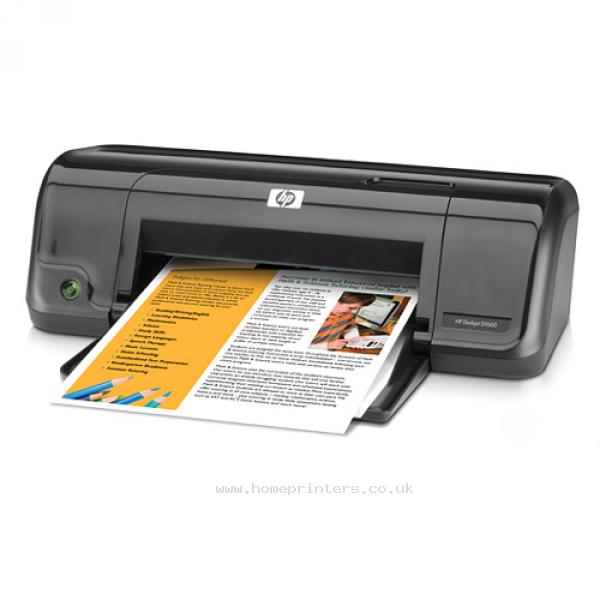
HP Deskjet D1660
Basic inkjet printer
Pros:
Good output in its class
Good value, very low price
Small and light
Cons:
Middling speeds
Limited paper handling
Short warranty period
HP's latest budget printer is the Deskjet D1660, which has almost no extra features but is praised as doing a good job at text and other occasional, basic printing tasks. The D1660 is very small and light -- it measures about 17 inches by 8 inches by 6 inches, and weighs less than 5 pounds. It's also surprisingly speedy and stylish. Most reviewers and owners feel that the D1660 and its Deskjet brethren are very good value for the money, stressing only that users should be aware of a budget printer's limitations. The D1660 has a number of drawbacks: it has no dedicated output tray, a limited paper capacity of 80 sheets, a mere 750-sheet monthly duty cycle and no physical controls beyond a power button. Reviewers note that the D1660 is best for occasional printing, since long-term ink consumption can get expensive. There are three colors in one cartridge, which must be replaced when only one color runs out. The Deskjet D1660 only has a 90-day warranty (most printers are covered for a year), though HP's phone support continues until a year after purchase.
Entry-level printers get less critical attention, and that, coupled with the HP Deskjet D1660's recent appearance on the market, means that the printer has few reviews available. We found a highly positive write-up at TrustedReviews.com, and CNET takes a good look at the older, step-up sister model of the D1660, the Deskjet D2660. There are also a handful of generally encouraging user reviews to be found at Amazon.com and at HP's own online store, though not enough to be statistically relevant.
Deskjet D1660 Printer Key Features:
Black print speed
Up to 20 ppm
Color print speed
Up to 16 ppm
Black print resolution
Up to 600 dpi
Color print resolution
Up to 4800 x 1200 optimized dpi color and 1200 input dpi when printing from a computer (on photo paper)
Duplex printing
Manual (driver support provided)
Display
N/A
Photo
Borderless printing
Yes (up to 4 x 6-in using tear-tab photo paper)
Direct photo printing
No
Memory card support
N/A
Technology
Real Life technologies
N/A
Paper
Supported paper sizes
Tray: Letter; legal; executive; No 10 envelopes; cards
Duplexer:
Duty cycle
Up to 750 pages
Paper handling
80-sheet input tray
Automatic paper-type sensor
No
Connectivity
Networking
None
Wireless capability
No
Connectivity
1 USB 2.0
General
Dimensions
17.01 x 7.8 x 6.22 in
Weight
4.85 lb
Supported operating systems
Windows Vista (32-bit & 64-bit), Windows XP (SP1 or higher [32-bit]), Windows 7 ready. Mac OS X v10.4, v10.5, v10.6
Compatible cartridges
HP 60 Black Ink Cartridge (~200 pages); HP 60 Tri-color Ink Cartridge (~150 pages); HP 60XL Black Ink Cartridge (~600 pages); HP 60XL Tri-color Ink Cartridge (~420 pages) [Average based on ISO/IEC 24711 or HP testing methodology and continuous printing. Actual yield varies considerably based on content of printed pages and other factors. Some ink from included cartridge is used to start up the printer.
ENERGY STAR qualified
Yes
Epson WorkForce 610
Pros: Good wireless printing. Set up was easy.
Cons: Not servicable to clean clogged printer head. Cheap plastics break easy. Service manual instructs to "break" some parts for service. Need to tear down the entire printer to replace head. Noisy. Cartridges run out very fast.
The Epson WorkForce 610 is a subtle refresh of last year's Epson WorkForce 600. We don't have a review for its predecessor, but the 610 is almost the same printer with the exception of an updated onscreen menu layout. For $200, you get a versatile mix of features such as an auto-document feeder on top of the printer for hands-free copying, scanning, or faxing of up to 30 sheets of paper, wireless and wired networking, and a comprehensive control panel that offers one-touch access to some of the printer's most popular features. While we continue to applaud Epson for its consistently fast-paced output speeds and easy printer setup, we are disappointed that the 610 lacks an auto-duplexer, an extra hardware add-on that can print on both sides of a sheet of paper. The omission surely isn't a deal breaker, but it's something we expect to come included with a $200 printer.
Auto-duplexing aside, business and home offices alike can count on the Epson WorkForce 610 to churn out high-quality black-and-white and color documents, thanks to a robust four-ink cartridge bay. The WorkForce 610 earns our endorsement by making work life easier with plenty of customizable buttons to control, a convenient onboard memory card reader, and optional creative software to close the loop between work and play.
Deskjet D1660 Printer Key Features:
Printing Technology: 4-color CMYK drop-on-demand MicroPiezo® ink jet technology
Minimum Ink Droplet Size: 2 picoliters
Maximum Print Resolution: 5760 x 1440 optimized dpi
ISO Print Speed:
- Black: 15 ppm1
- Color: 9.3 ppm1
PC-Free Printing:
- Print all photos
- Photo index sheet
- Color photo restoration
- Scan to PDF
- Scan to memory card
- Auto Photo Correction
- Print your own school papers &38212; college-ruled, wide-ruled, graph papers and personalized stationery
Copy Quality:
- Color
- Black/White
- Draft
- Normal
Copy Quantity: 1 – 99 (PC-free)
Maximum Copy Size: 8.5" x 11" (PC-free)
Copy Features:
- Fit to page
- Automatic reduction and enlargement (25 – 400%)
Scanner Type: Color flatbed
Photoelectric Device: Color CIS line sensor
Optical Resolution: 2400 dpi
Hardware Resolution: 2400 x 2400 dpi
Maximum Resolution: 9600 x 9600 dpi interpolated
Scanner Bit Depth: 48-bit color / 24-bit output
Fax Settings: Black-and-white and color
Fax Speed: Modem: 33.6 Kbps — as fast as 3 sec per page
Memory: Up to 180 pages
Speed Dials: 60
PC Fax: Supported2
PC-Free Paper Support:
- Plain (8.5" x 11")
- Photo (4" x 6", 5" x 7", 8” x 10”, 8.5" x 11", 16:9 wide)
Automatic Document Feeder: 30 Sheets
Paper Sizes: 3.5" x 5", 4" x 6", 5" x 7", 8" x 10", 8.5" x 11", 8.5" x 14", A4, B5, A5, A6, half letter, executive, user definable (3.5" – 44" in length)
Maximum Paper Size: 8.5" x 44"
Borderless Sizes: 3.5" x 5", 4" x 6", 5" x 7", 8" x 10", 8.5" x 11", A4, 16:9 wide
Paper Types:
- Plain paper
- Epson Bright White Paper
- Photo Paper Glossy
- Premium Photo Paper Glossy
- Ultra Premium Photo Paper Glossy
- Premium Photo Paper Semi-gloss
- Presentation Paper Matte
- Premium Presentation Paper Matte
- Premium Presentation Paper Matte Double-sided
- Matte Scrapbook Photo Paper (letter)
Envelope Types:
- No. 10
- DL
- C6
- Plain paper
- Bond paper
- Air mail
Input Paper Tray Capacity: 100 sheets plain paper, 10 envelopes
Ink Type: DURABrite® Ultra pigment ink (smudge, fade, water resistant, and highlighter friendly)
Ink Palette: Cyan, Magenta, Yellow and Black
Ink Cartridge Configuration: 4 individual ink cartridges
Fade Resistance / Print Longevity: Up to 118 years3
Replacement Ink Cartridges:
- Extra High-capacity Black (T097120)
- High-capacity Black (T068120)
- High-capacity Cyan (T068220)
- High-capacity Magenta (T068320)
- High-capacity Yellow (T068420)
- High-capacity Multi-pack color (T068520)
- Standard-capacity Black (T069120)
- Standard-capacity Cyan (T069220)
- Standard-capacity Magenta (T069320)
- Standard-capacity Yellow (T069420)
- Standard-capacity Multi-pack color (T069520)
Interface: Hi-Speed USB 2.0, Wireless Wi-Fi (802.11 b/g) — Compatible with 802.11n, Wired Ethernet (10/100 Mbps)
Supported Memory Cards:
- CompactFlash®
- Microdrive®
- Memory Stick®
- Memory Stick Duo™5
- MagicGate™ Memory Stick
- MagicGate Memory Stick Duo™5
- Memory Stick PRO™
- Memory Stick Pro Duo™5
- Secure Digital (SD™)
- SDHC™
- Mini SD™5
- Mini SDHC™5
- Micro SD™5
- Micro SDHC™5
- MultiMediaCard™
- xD-Picture Card™
- xD-Picture Card Type-M
- xD-Picture Card Type-H
Direct Camera Connection: Front PictBridge™ port (print from digital cameras and mobile phones, PC-free)
Operating Systems:
- Windows® 7, Windows Vista®, Windows XP, Windows XP x64, Windows 2000
- Mac OS® X 10.3.9, 10.4.11, 10.5.x and 10.6.x
For the latest information regarding Snow Leopard, please visit www.epson.com/support/snowleopard
LCD Screen: 2.5", tilt LCD display
Supported Digital Camera Technologies: Epson PRINT Image Matching®, Exif Print, DPOF, DCF v. 1.0 / 2.0
Color Management: Auto Photo Correction, Epson Vivid Color™, Adobe RGB and ICM
Temperature:
Operating
- 50° to 95° F (10° to 35° C)
Storage
- -4° to 104° F (-20° to 40° C)
Humidity:
Operating
- 20 – 80%
Storage
- 5 – 85% (no condensation)
Sound Level: 40 dB
Rated Voltage: 100 – 120 VAC
Rated Frequency: 50 – 60 Hz
Rated Current: 0.6 Amp
Power Consumption:
- Normal mode: Approx. 20 W ISO 10561
- Sleep mode: Approx. 2.9 W
- ENERGY STAR® qualified
Safety Standards: Safety standards UL60950, CSA C22.2 No. 60950, EMI FCC Part 15 subpart B class B, CAN / CSA-CEI / IEC CISPR 22 class B
Dimensions:
- Printing: 18.1" x 22.1" x 12" (W x D x H)
- Storage: 18.1" x 13.6" x 9.3" (W x D x H)
Weight: 18.3 lb
Software Included: Epson printer driver, Web to Page, Epson Scan, ArcSoft® Print Creations, PageManager® (e) 8.15 with OCR
Brother MFC-5890CN multifunction printer
Pros:
A3 printing, good photo quality, easy-to-use front panel, not a space hog
Cons:
Slow in our document printing test, inks can be tricky to install, scanner didn't pick up fine details
Brother's MFC-5890CN is a six-in-one inkjet multifunction device that allows you to print, scan, photocopy, read memory cards, and send and receive faxes all from the same unit. Not only that, it can print at up to A3 size and it's quite good as a photo printer.
Brother MFC-5890CN Printer Key Features:
Copier featuresMaximum copy resolution (b&w)
1200dpi
Maximum copy resolution (colour)
1200dpi
Paper handling
Supported media sizes
A3, A4
Supported media types
Glossy paper, Plain paper
Total media capacity (sheets)
150
Printer features
Printer usage
Home, Small / home office
Number of ink/toner cartridges
4
Cost per A4 page (colour)
23c
Maximum print resolution
6000dpi
Automatic duplex (doublesided printing)
No
Scanner features
Maximum scan resolution (colour)
2400dpi
Warranty
Warranty information
Return to base
Warranty length (months)
24
Wired connections
Wired Terminals / Ports
Ethernet, USB 2.0
HP LaserJet Pro m1212nf multifunction monochrome laser printer
Pros:
Simple to operate via USB or Ethernet, fast printing with good text quality at both 600dpi and 1200dpi
Cons:
Average monochrome graphic quality with intermittent banding
The HP LaserJet Pro m1212nf is a multifunction monochrome laser printer aimed at small businesses and home offices. It’s a great choice if you want to print up to 2000 pages per month for a low price, and its scanning and copying features come in handy. Text quality is good in both 600dpi and 1200dpi modes, but we noticed a few small problems in the quality of monochrome graphics.
HP LaserJet Pro m1212nf Printer Key Features:
Copier features
Maximum copy resolution (b&w)
600dpi
Maximum copy resolution (colour)
600dpi
General
Paper handling
Total media capacity (sheets)
150
Power
Printer features
Printer usage
Small / home office
Number of ink/toner cartridges
1
Cost per A4 page (b&w)
6.8c
Stated print speed (b&w)
18
Maximum print resolution
1200dpi
Duty cycle (pages per month)
8000
Scanner features
Maximum scan resolution (colour)
600dpi
Size and weight
Software
Warranty
Warranty length (months)
12
Wired connections
Wired Terminals / Ports
Ethernet, USB 2.0
Canon Laser Shot LBP 3100B
Pros:
Adequate printing speeds, simple toner replacement, attractive design
Cons:
Awfully ugly paper output tray, text quality slightly inaccurate, starter cartridge packaged with printer
The LBP 3100B’s low initial cost is well complemented by attractive design and decent printing speeds. Still, some odd design choices and slightly inaccurate printing mar this printer a little — it’s good but it doesn’t excel when compared to the competition.
HP LaserJet Pro m1212nf Printer Key Features:
General
Power
Printers
Printer Usage
Small Office / Home Office
Maximum Resolution (B&W)
600dpi
Print Speed B&W (pages per minute)
16
Print Media
Print Media Supported
A4, Plain paper
Print Media Size Maximum
A4 (210 x 297mm)
Print Media Load Type
Automatic
Total Media Capacity (Sheets)
150
Software
Compatability
Mac OS, Windows
Wired Connections
Wired Terminals / Ports
USB 2.0
Brother HL-3070CW colour LED printer
Pros:
Wi-Fi is easy to configure, password-protected printing, user-upgradeable memory
Cons:
Small LCD display, no direct print support for Microsoft Word files and plain text documents, colour accuracy issues, expensive consumables
Extensive connectivity and simple configuration make Brother's HL-3070CW colour LED printer easy to setup and use in a networked environment.
The Brother HL-3070CW colour printer is one of the company’s first to use LED technology. Competing with entry-level colour laser printers, the HL-3070CW is reasonably quick and it's easy to set up.
The Brother HL-3070CW prints in the same basic way as any laser: the printer uses toner powder to paint an image onto a rotating drum which is then transferred to paper. Instead of using a laser to paint this image, the HL-3070CW simply uses a line of LEDs; the same type used to backlight the some recent LCD monitors and TVs.
Brother HL-3070CW Printer Key Features:
Copying Features
Faxing Features
General
Memory
Installed memory (RAM)
32 GB
Maximum memory (RAM)
512 MB
Power
Printers
Maximum Resolution (Colour)
2400dpi x 600dpi
Print Speed B&W (pages per minute)
16
Print Speed Colour (pages per minute)
16
Print Media
Print Media Supported
A4, Plain paper
Print Media Size Maximum
A4 (210 x 297mm)
Print Media Load Type
Automatic
Total Media Capacity (Sheets)
250
Media Feeders
Front paper cassette
Monthly Duty Cycle
25, 000
Scanner Features
Software
Compatability
Mac OS, Windows
Wired Connections
Wired Terminals / Ports
RJ45, USB 2.0
Wireless Connections
Wireless technology supported
Wirele
Conclusion:
Choose a desktop Printer that suites your needs!